Your client sees the cut before you cut it
Take 4 photos, pick up to 4 cuts and show them on the tablet how each one looks on their own face. They decide in seconds and leave with what they wanted.
Free while we're in pilot.
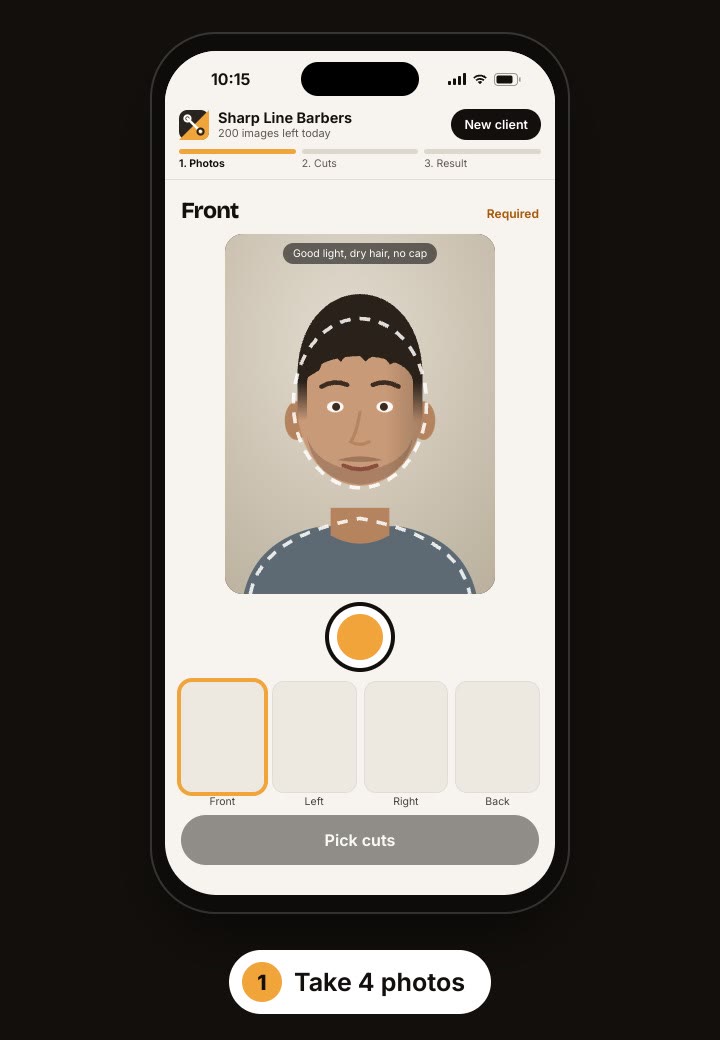
Three steps, under a minute
- 1
4 guided photos
Front, both sides and back. The screen guides you so they come out right: good light, head centered.
- 2
Pick the cuts
Up to 4 of the most requested cuts (fades, crops, buzz, Edgar, mullet…) or type the one your client asks for.
- 3
They see it on themselves
Front first; one tap for the sides and back. Slide to compare before and after.
Fewer “that's not what I asked for”, more clients trying something new
On the same page from the start
Your client points at a picture instead of describing a cut in words. You cut with a clear reference.
They dare to change
The guy who always asks for the same thing tries something new once he's seen himself with it.
A moment they remember
It's the part of the visit your client tells his friends about.
Photos aren't kept
Photos are only used to make the preview and are cleared when you tap “New client”. We don't store faces.
On a tablet or phone
It runs in the browser. Add it to the home screen and open it like an app.
Nothing to install
Sign in with a code sent to your email. No passwords.
Frequently asked questions
It looks like a photo: same client, same light, same background. It's a guide: the real result depends on their hair type and your work.
They're sent to an AI service only to make the preview and aren't stored anywhere. Tap “New client” and they're gone from the screen.
During the pilot it's free for the barbershops we activate. Before we ever charge, we'll email you first and you decide whether to continue.
A tablet or phone with a camera and an internet connection. It runs in the browser; nothing to install.
Haircuts only for now. Beards and color come later.
Try it in your barbershop
We're activating barbershops one by one. Request access and we'll email you.